Homelab Server Rack
My home server setup running Arch Linux, Docker, and various self-hosted services — including this very website.
Overview
My homelab is built around a custom wooden server rack that I built myself. It runs Arch Linux, hosts services in Docker containers, and connects to the outside world through Cloudflare Tunnels with no open firewall ports.
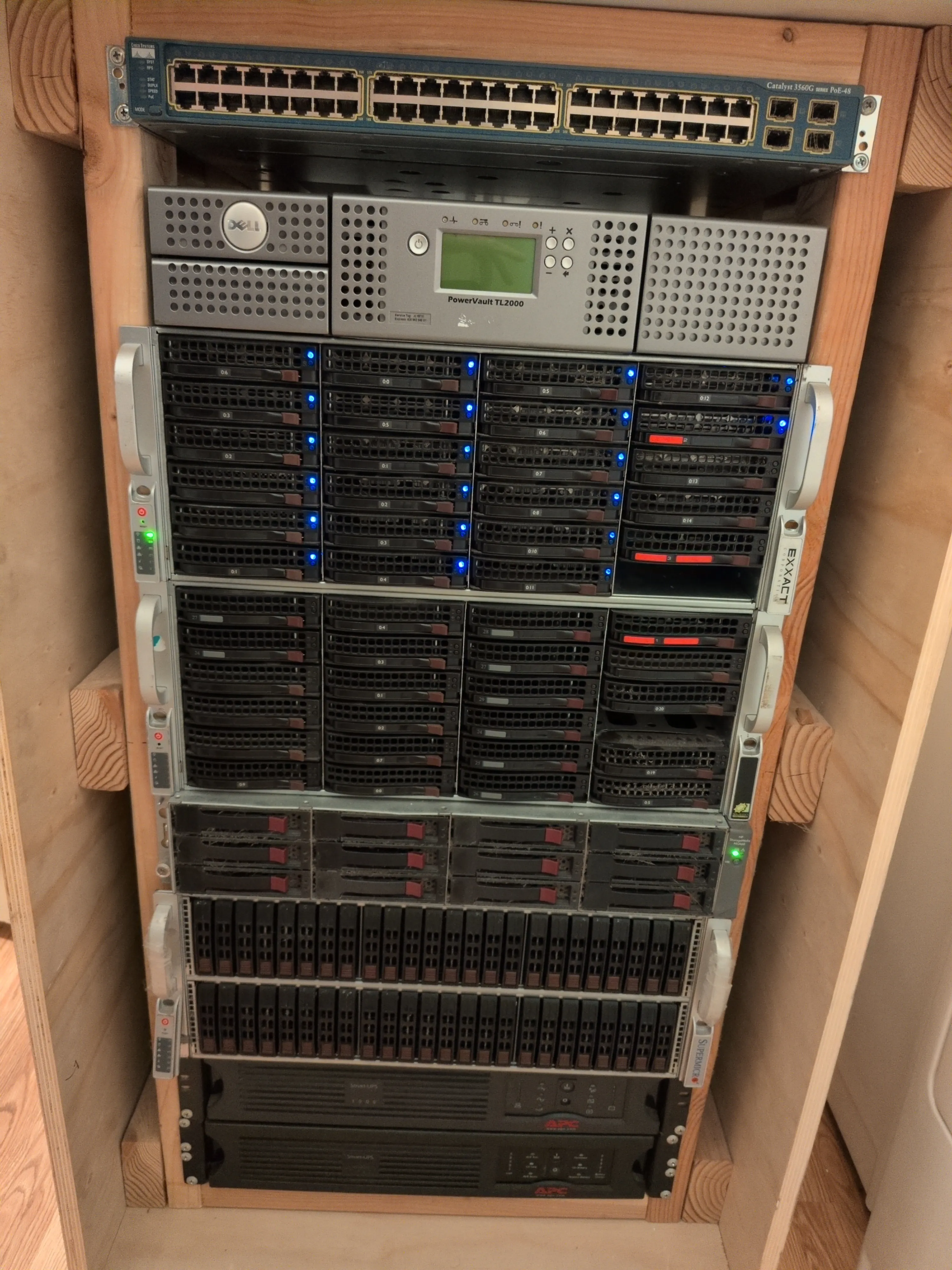
The Rack (Top to Bottom)
Cisco 3560G POE Switch — Currently deactivated due to power consumption. Way more ports than I need, so I replaced it with a couple of smaller switches: a 4-port 10GbE switch and a 4-port POE switch for security cameras.
Dell PowerVault TL2000 — A tape auto-changer with 2x LTO-6 drives and capacity for 24 tapes. Not in use yet, but I have some LTO-6 tapes and plan to use it for backups eventually.
Supermicro Chassis (Main Server) — The workhorse. Dual Xeon E5-2690 v2 @ 3.00GHz, 512GB RAM, and 4x ZFS datasets totaling around 240TB — primarily used for AI datasets. Runs Arch Linux and all the Docker containers.
Old Server — One generation older CPUs, 128GB RAM. Originally had the same drives but they were migrated to the main server. Mostly retired at this point.
HP 12-Bay Storage Array — Connected to the main server and hosts one of the ZFS arrays.
88-Bay Supermicro DAS — Loaded with 48x 600GB 10K RPM drives. Taken offline due to power concerns — it pulled around 600W at idle. Fun to play with but not practical when it’s still slower than an NVMe drive while using significantly more power.
2x UPS Units — Unfortunately both have dead batteries I haven’t gotten around to replacing, so the rack currently runs without UPS protection. Fixing this is on the to-do list, along with removing the old/unused equipment.
Networking
On top of the rack (not pictured) sits a Dell mini PC running OPNsense as the router. It supports 2.5GbE and also hosts OpenVPN for remote access to my home network.
The ZFS datasets are shared via NFS to my desktop over 10GbE. I may upgrade this to 40Gb fiber at some point — I have a few cards laying around for a point-to-point connection.
Services
Containers are managed through Dockge and currently include:
- Home Assistant + supporting containers for home automation
- Homepage dashboard
- Immich — locally hosted Google Photos replacement
- TeslaMate — pulling statistics from my car
- This website — Astro static site served by nginx
- A few others
Management
I have a monitor and keyboard attached for physical access if needed, but I primarily connect via SSH or the Cockpit web UI.
Power & Future Plans
The rack currently draws around 650W, and I’m working on getting that down further. A few things on the roadmap:
- Consolidate storage — move the HP DAS drives into the main server chassis to simplify and reduce power
- Replace UPS batteries — get the rack back behind proper UPS protection
- Remove retired equipment — the old server, the Cisco switch, and the 88-bay DAS are all candidates for removal
- Platform upgrade — I’d like to move to EPYC for better power efficiency over the aging Xeons, but the current RAM shortage has put that on hold
Philosophy
The goal isn’t just to self-host things — it’s to understand every layer of the stack. From networking to containers to DNS, running your own infrastructure teaches you things that cloud services abstract away.